
We Can't Certify Compliance. We Can Facilitate Compliance.
Compliance is not a certificate. It is a record: who was trained and when, which machine is due, who has the laptop, who left and what was closed behind them. The SecureLynx Compliance Portal keeps that record for you, dated and printable, and it is included with all managed engagements.
What Facilitating Means.
Be wary of any IT provider who tells you they make you compliant. None of them can, and the ones who say so are selling you a feeling.
What The Portal Does
- Holds the record, dated, in one place
- Prints it in a shape an inspector or insurer reads
- Shows what is due before it is late
- Keeps a departure on file after it is closed
- Exports on demand, without asking us
What It Does Not Do
It does not certify anything, and it does not verify what you type into it. Your equipment serials, your service dates and your vendor list are your assertions; the portal stores and prints them and says on every sheet that SecureLynx did not check them.
It is also a secondary source, and the reports page says so in bold: keep your primary copy on your own premises. A portal that quietly became the only copy of your evidence would be a liability we handed you, not a service.
What Your Practice Sees.
Every number on these screens is derived from something that happened. Nothing on the dashboard is decorative.
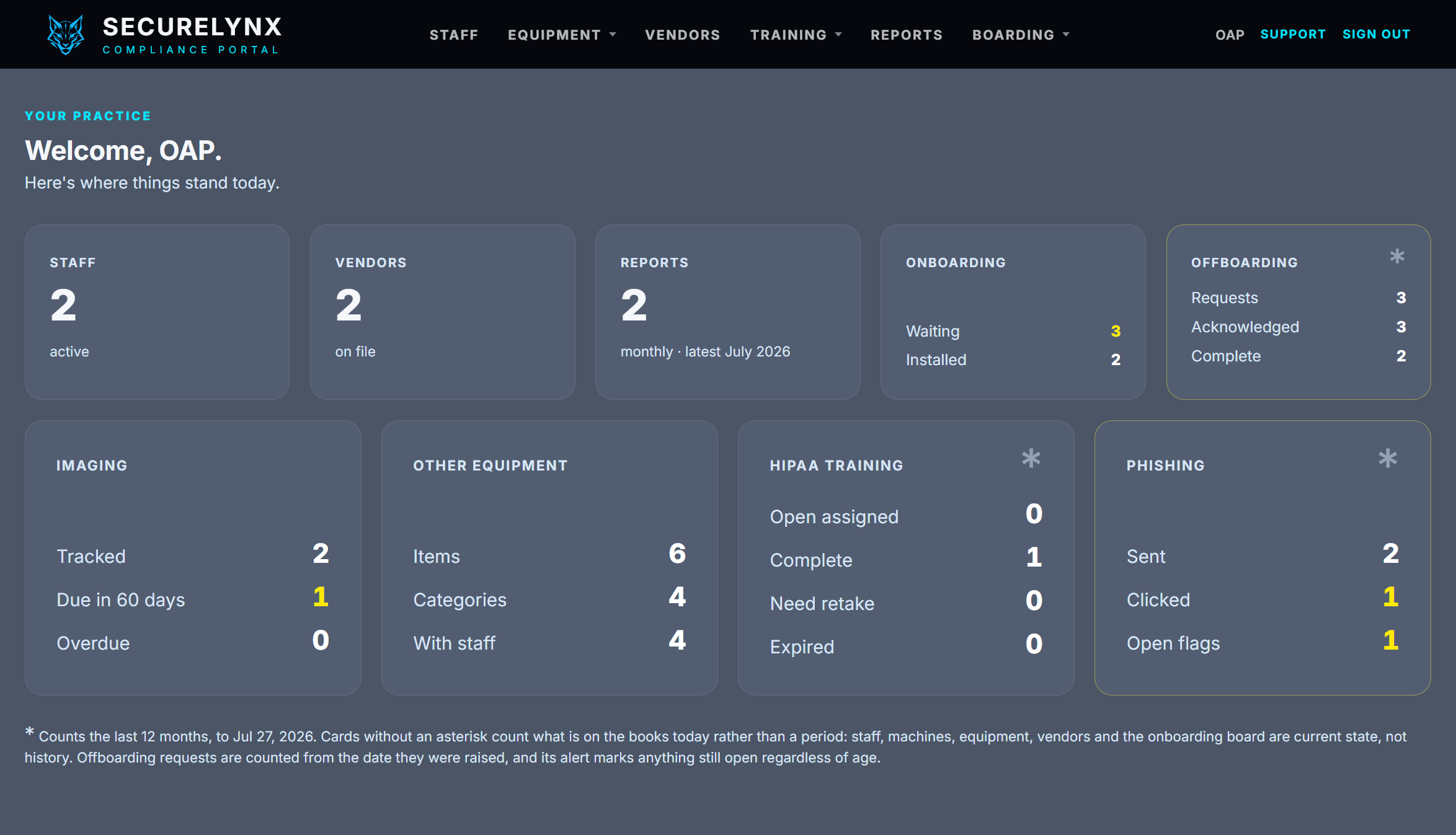
Where things stand today
Five plain facts on top, four things that can go wrong beneath. Cards marked with an asterisk count the last twelve months; the rest count what is on the books today, and the page says which is which rather than leaving you to guess.
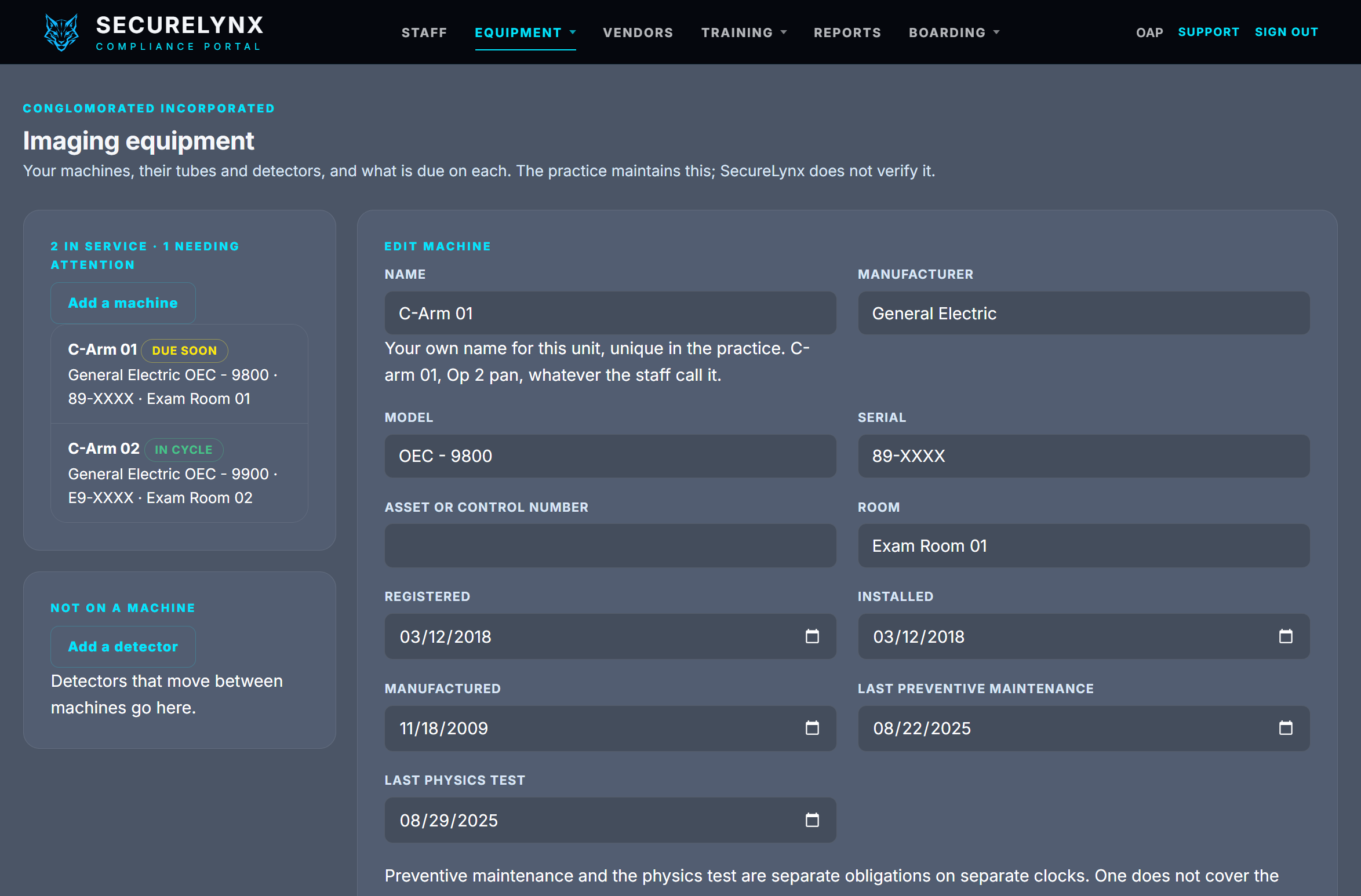
Imaging, on two separate clocks
Preventive maintenance is your service contract's obligation. The annual physics test is the regulator's. A practice that treats one as covering the other fails an inspection while believing it is fine, so the console never merges them. Fit a new tube and the physics test reopens; swap a detector and it does not, because that is a recalibration and nothing else. The inventory sheet prints to the shape the state's pre-inspection letter asks for.
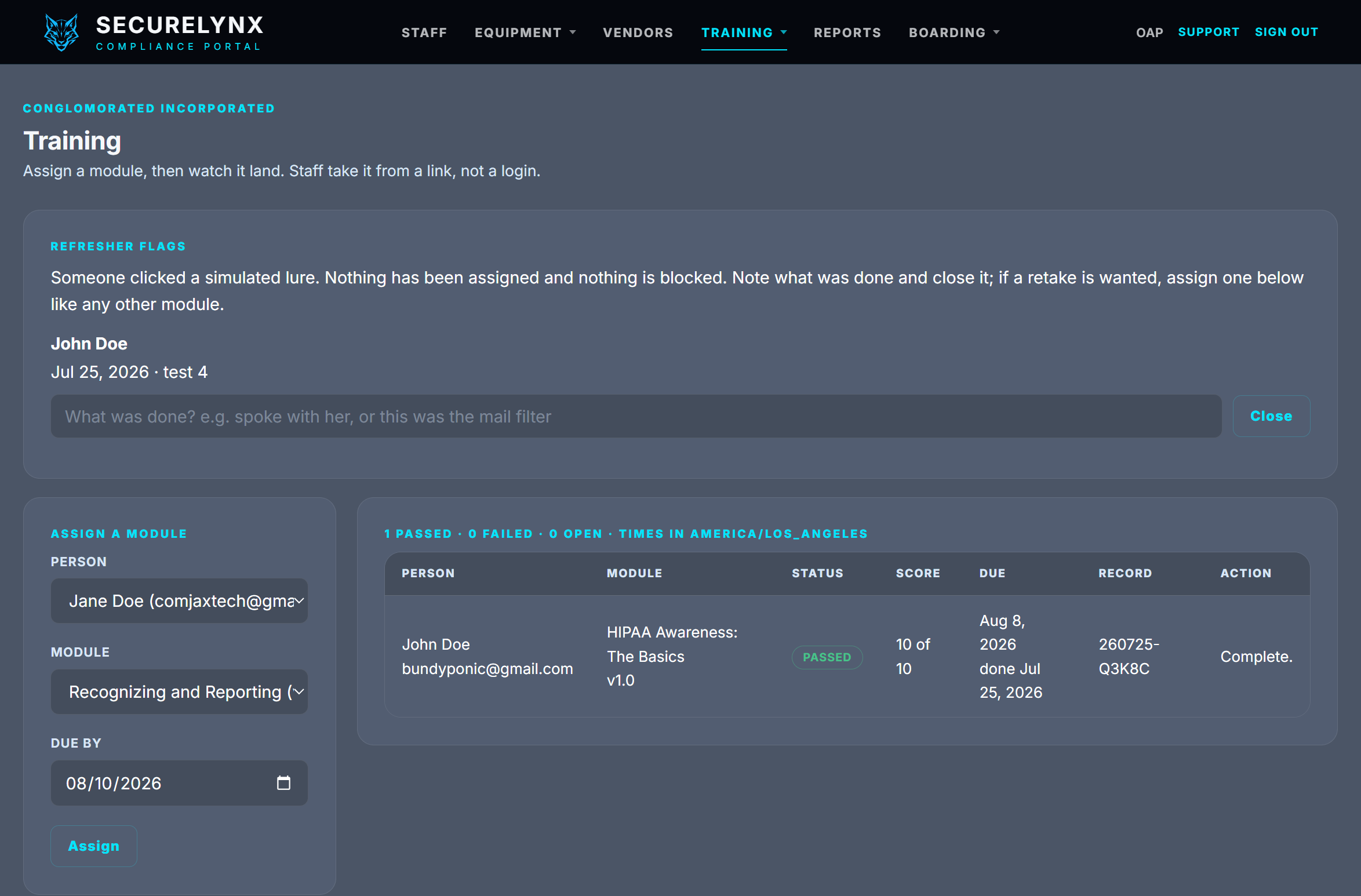
Training, per person, with a record number
Staff take a module from a link rather than a login, and the completion lands as a dated record carrying your practice name, the score and a number you can quote. A failed attempt stays on the record; a retake is a new row, so nobody can quietly loop until they pass.
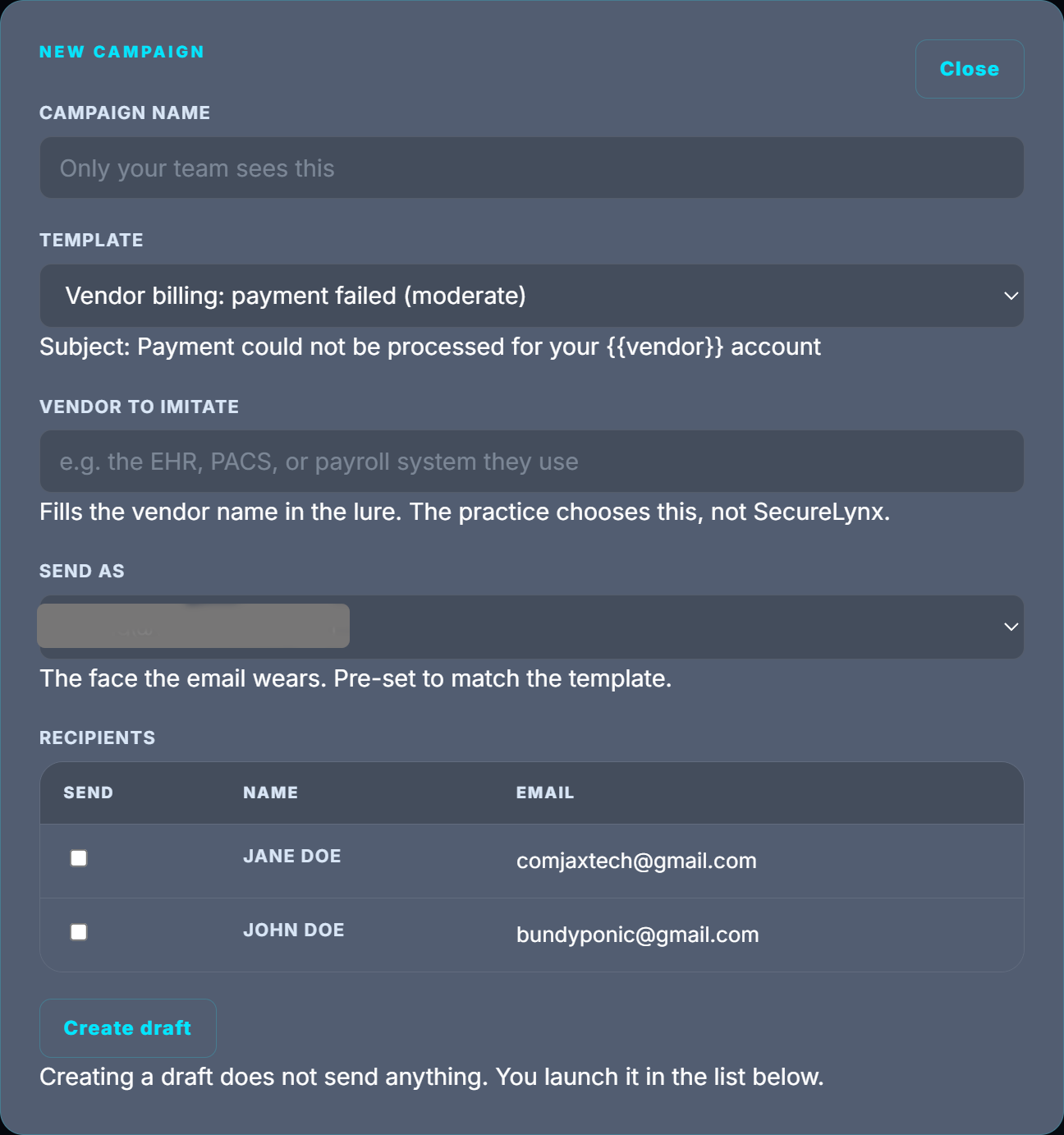
Phishing simulations you run yourself
You pick the pretext, the vendor it imitates and who receives it, then review before anything sends. Creating a draft sends nothing; you launch it yourself from the list, to the people you ticked, and nobody is surprised by a test they did not authorise.
The templates are the ones that actually work on a practice: a billing failure from a vendor you use, a policy notice that needs action, an unusual sign-in warning. You name the vendor to imitate, because you know which EHR or PACS or payroll system your staff would not question and we do not. New templates are added periodically as the lures in the wild change, and they arrive in your list without you doing anything.
A click raises a flag for someone to look at. It is not an assignment and it blocks nothing. Somebody notes what was done and closes it, and that note is the record. A mail filter prefetching the link looks the same as a person from here, which is why the note is a place to write what you found rather than a verdict handed down.
The tracking runs on a separate credential that can write a click and read nothing at all. The domain sending the lure cannot reach your records even in principle, which is a structural guarantee rather than a policy we are asking you to trust.
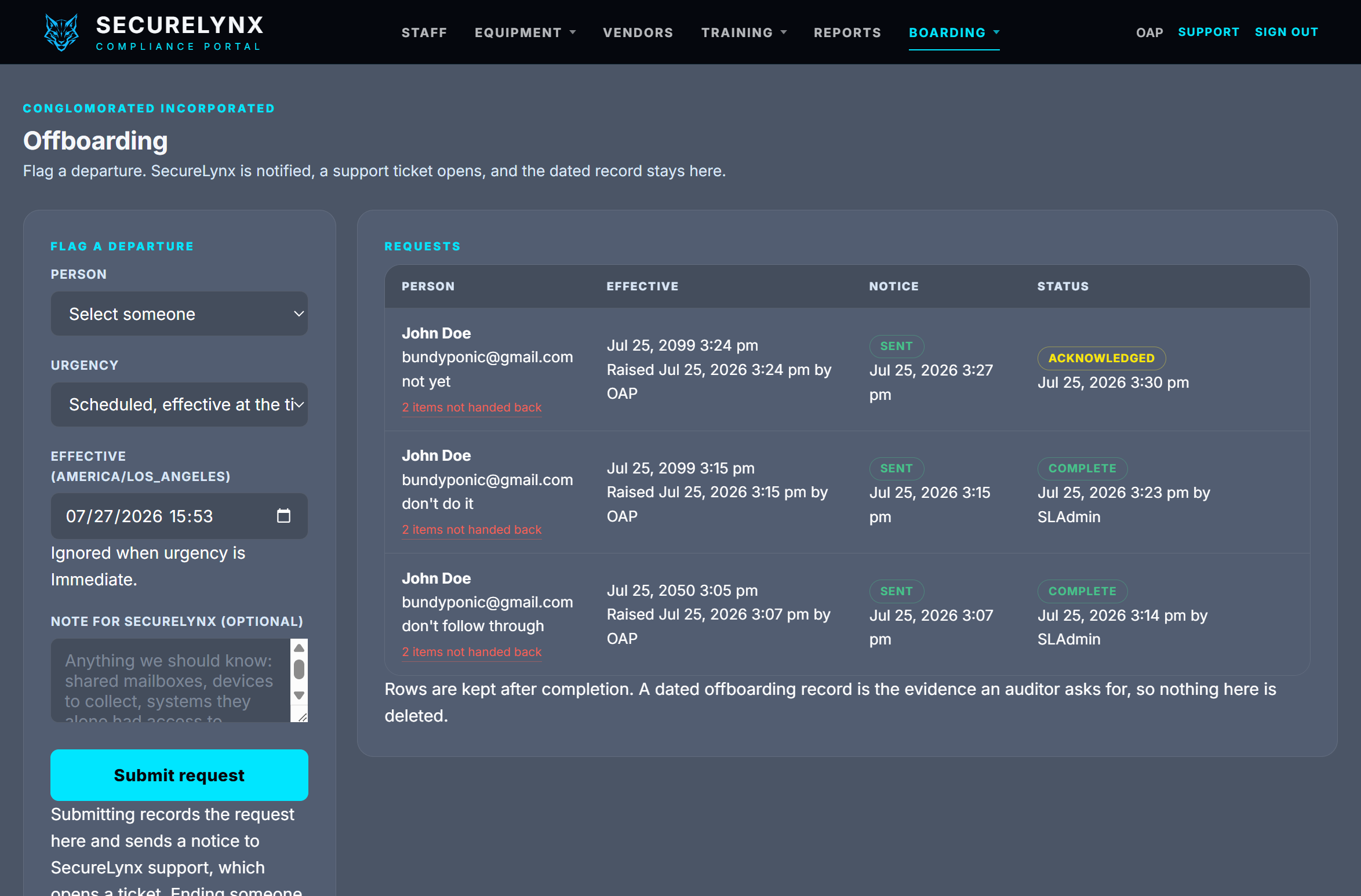
Departures, dated and kept
Flag a departure and SecureLynx is notified, a support ticket opens, and the clock is on us. What stays behind is the part that matters later: a dated record of when access closed and who closed it. Rows are never deleted, because a dated offboarding record is exactly what an auditor asks for and exactly what nobody can produce from memory.
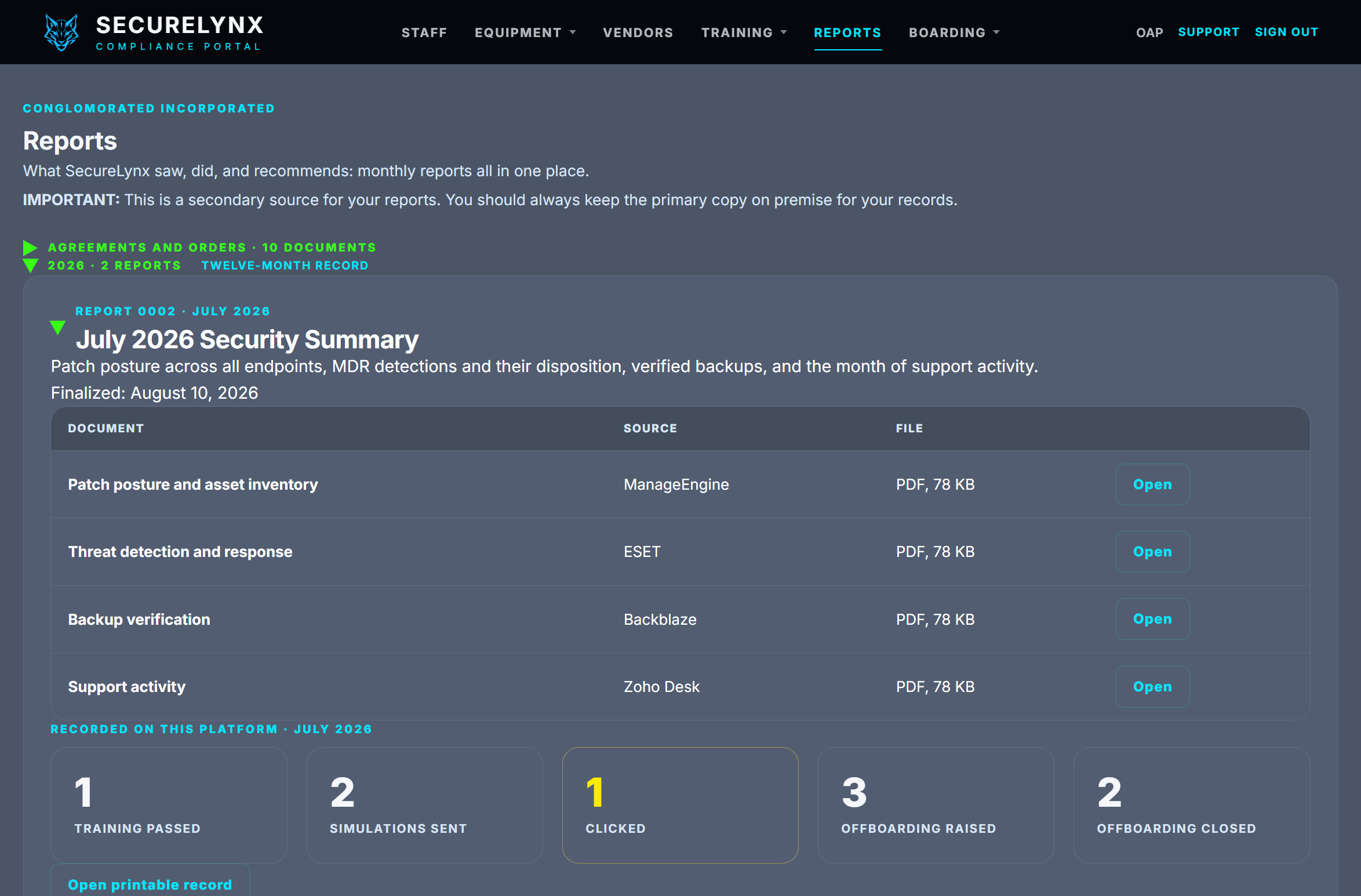
Month-to-month reporting, in one place
Patch posture, threat detection, verified backups and support activity, gathered from the tools that produced them. Four documents a month, each from the vendor that generated it, so a reader can see the source rather than take our summary of it.
Underneath them sit the figures the platform recorded itself: training passed, simulations sent, who clicked, departures raised and closed. Those are not gathered from anywhere, they happened here, which is why the section says so plainly rather than blending them in with the vendor reports.
Each month prints as one record. The agreements you signed are filed in the same place, so the paper and the evidence live together instead of in two systems that disagree about which month it is.
The page also says, in bold, that this is a secondary source and your primary copy belongs on your own premises. A portal that quietly became the only copy of your evidence would be a liability we handed you.
Screens shown are a sample practice with illustrative data. Client records are visible only to the practice that owns them.
The Unglamorous Half.
Equipment And Vendors
Everything that isn't imaging is a list rather than a tracker. Workstations, phones, printers, etc., have no physics test. What it carries is custody: who has the laptop, since when, and who had it before.
The vendor list is yours: who to call when the phones are down, with the account number, printable as a binder sheet and as cut-out cards for the front desk.
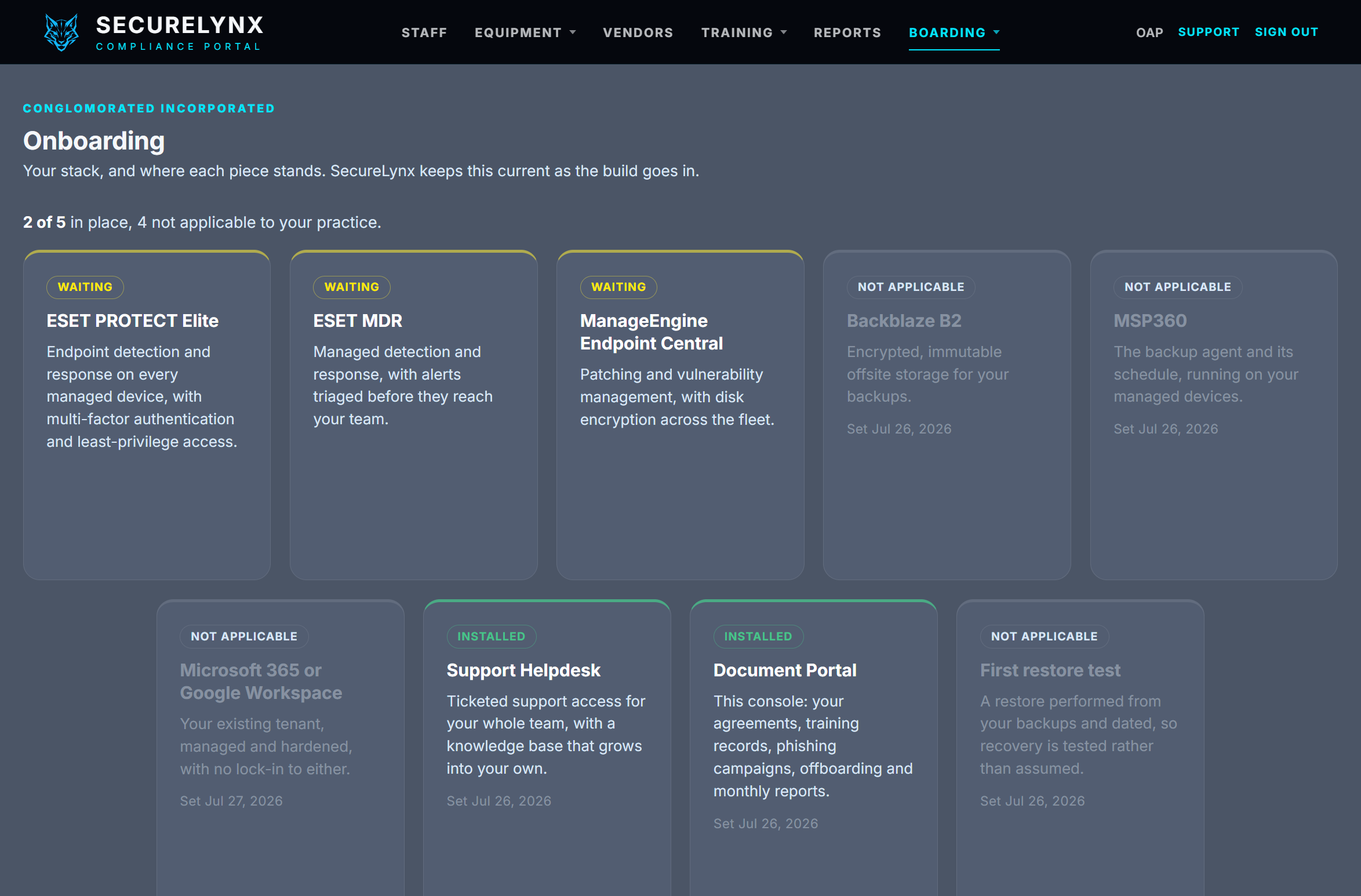
Onboarding, Ours To Show
The one page about our delivery rather than your records: the regulated stack, piece by piece, each one waiting, installed, or not applicable to your practice, with the date it went in.
The first restore test is on that board too, and it refuses to read as installed without the date it was actually run. Recovery gets tested rather than assumed.
Priced Elsewhere. Included Free Here.
Compliance software is its own industry, and a practice can buy a console like this on its own. It is worth knowing what that costs before you decide it is a small thing.
How The Category Prices
Standalone HIPAA compliance platforms are generally sold as a monthly platform fee plus a charge for every employee, billed annually. The tiers carrying the pieces this portal carries, vendor and agreement tracking, recorded staff training, simulated phishing, run in the low to middle hundreds a month for a small practice, before the per-seat charge is added.
That buys the compliance layer by itself. It does not patch a workstation, answer a ticket, restore a backup, or turn up when the server room is warm. A practice buying one of those still needs somebody running the IT.
What SecureLynx Does
The portal is included with every managed engagement. Not a tier, not a per-seat add-on, not a line on the invoice. It exists because we needed the evidence organized to do our own job properly, and once it is organized there is no reason to charge you twice for looking at it.
Our pricing is published on this site, with a calculator that prices your own environment rather than a form that books a call. Access to the compliance portal is included with every regulated engagement.
What's Important to Note
This is not a like-for-like comparison and we are not going to pretend it is. The dedicated platforms carry things this portal does not: policy libraries you can adopt wholesale, exclusion screening against federal lists, structured risk-assessment questionnaires, and in some cases frameworks well beyond HIPAA. They are built to be bought by a practice that already has its IT handled, and for that practice one of them may well be the right purchase.
What we are saying is narrower. If you are engaging a managed IT provider anyway, the evidence layer should not be a second subscription, and with us it is not. Figures above describe the shape of the market rather than any one vendor, and vendor pricing moves, so check the current number at the source before you weigh it against ours.
The Portal, Answered.
Do you certify that we are compliant?
No. SecureLynx is not a certifying body, and no managed IT provider is. What the portal does is carry the record: it stores what happened, dates it, and prints it in a form an auditor or an insurer can read. Whether that record satisfies a given obligation is a judgement for your compliance officer, your counsel, or an accredited assessor. Every sheet the portal produces says so in its own footer, in those words.
Who at SecureLynx can see our records?
Your practice sees its own records and nothing else; the separation is enforced on every read, not by a setting anyone can toggle. SecureLynx staff with master access can see across practices, which is what lets us maintain the platform and complete an offboarding you have raised. The simulated-phishing tracking runs on a separate database credential that can write a click and read nothing at all, so the domain that sends a lure cannot reach your records even in principle.
What happens to the record if we leave?
You export it and keep it. The evidence record, the equipment inventory, the vendor list and the training history all print from inside the portal at any time, without asking us, and that does not change on the way out. We also say plainly on the reports page that the portal is a secondary source: your primary copy should live on your own premises, so that leaving is a matter of losing a convenience rather than losing a record.
Is the portal included, or is it extra?
Included. It comes with every managed engagement and is not sold separately, priced per seat, or gated behind a tier. It exists because the alternative is a shared drive and a memory, and because we would rather build it once and keep it current than assemble the same evidence by hand every time somebody asks for it.
Do we have to use it?
No. Nothing in the portal blocks anything, assigns anything, or nags anyone. A refresher flag raised by a simulated-phishing click is a prompt for a person to look at, not an enforcement, and it issues no training on its own. Practices that keep their own binders are welcome to; the portal is there so that the answer to a question is one page rather than an afternoon.