
Handling PHI Day to Day
About 15 minutes. The habits that keep patient information safe while you work: email, phone, fax, records requests, printing, and disposal. Read the short sections, answer ten questions, and your record of completion displays to print or save. Nothing is sent to SecureLynx, and nothing is stored.
Read this first
This is free HIPAA awareness education. It is not certification, and completing it does not make you or your practice HIPAA compliant. There is no such thing as being "HIPAA certified."
The record you print at the end is a self-reported record of completion: you type your own name and nothing verifies your identity. It documents that the training was taken. It is not a verified compliance record.
Your name and answers never leave this page. SecureLynx stores no copy. When you finish, the record shows on screen for you to keep. It is the only copy, so save or print it.
The mindset: minimum necessary, in motion
Handling PHI well is mostly the minimum necessary rule applied to everyday tasks. Before you send, say, print, or file anything, ask two questions: does this person have a right to it, and is this the least amount needed to do the job? If the answer to either is unclear, slow down and check.
Most breaches are not dramatic attacks. They are ordinary steps done a little too fast: the wrong recipient, the extra pages, the unattended screen. Steady habits are the protection.
Email and messaging
Send PHI only through systems your practice has approved and secured, such as an encrypted email option or a patient or provider portal. Keep PHI out of personal email and personal text messages, and out of any app the practice has not approved, even when it would be faster.
Typing "confidential" in the subject line does not make regular email secure. If you are unsure whether a channel is safe for PHI, treat it as if it is not, and ask.
Phone and in-person disclosures
Before you share anything by phone or in person, confirm who you are speaking to and that they have the right to receive it. Being a spouse, parent, or coworker does not by itself grant access. When in doubt, verify identity and authority first, and share only what is needed.
Keep conversations about patients out of waiting rooms, hallways, elevators, and speakerphone in shared spaces.
Fax and mail
Faxing and mailing PHI still happen, and both are easy to misdirect. Before you fax, confirm the number, confirm someone is expecting it, use a cover sheet, and send only the pages needed. Do not rely on a number saved in the machine's memory without checking it.
If a fax or a letter with PHI goes to the wrong place, report it to your Privacy or Security Officer right away so it can be assessed and handled. Do not just avoid the number next time.
Records requests
When a request for records arrives, do not rush to be helpful. First confirm the request is valid and properly authorized, then route it through your practice's process. Provide only what was asked for and authorized, not the full history "to be safe," and never more than one patient's information at a time.
Timelines and final decisions on records requests belong to the right person at your practice. Your job is to route it correctly, not to improvise.
Printers, copiers, scanners, and screens
Shared printers are a common leak point. Retrieve documents with PHI promptly, and use secure or badge release if your practice offers it. Clear originals from copier and scanner glass, and lock your screen whenever you step away, even for a minute.
Disposal
PHI does not go in the regular trash or recycling, and tearing paper in half is not disposal. Paper with PHI goes into secure shredding. Devices that held PHI, such as an old workstation, phone, or drive, are wiped or destroyed through IT following secure procedures, never donated, sold, or stored with the data still on them.
Ten questions
Answer all ten. A pass is eight correct (80%). Your answers are scored here in your browser and are never sent anywhere.
HIPAA Awareness Training
Handling PHI Day to Day
This documents that the individual named below completed the awareness module. It is a record of training taken. It is not a certification of HIPAA compliance.
Keep this copy. SecureLynx retains no record of this completion. The name is self-reported and the reference code is for your own filing, not proof of identity. This is awareness education, not certification, and it does not by itself establish HIPAA compliance.
Provided by SecureLynx · securelynx.it
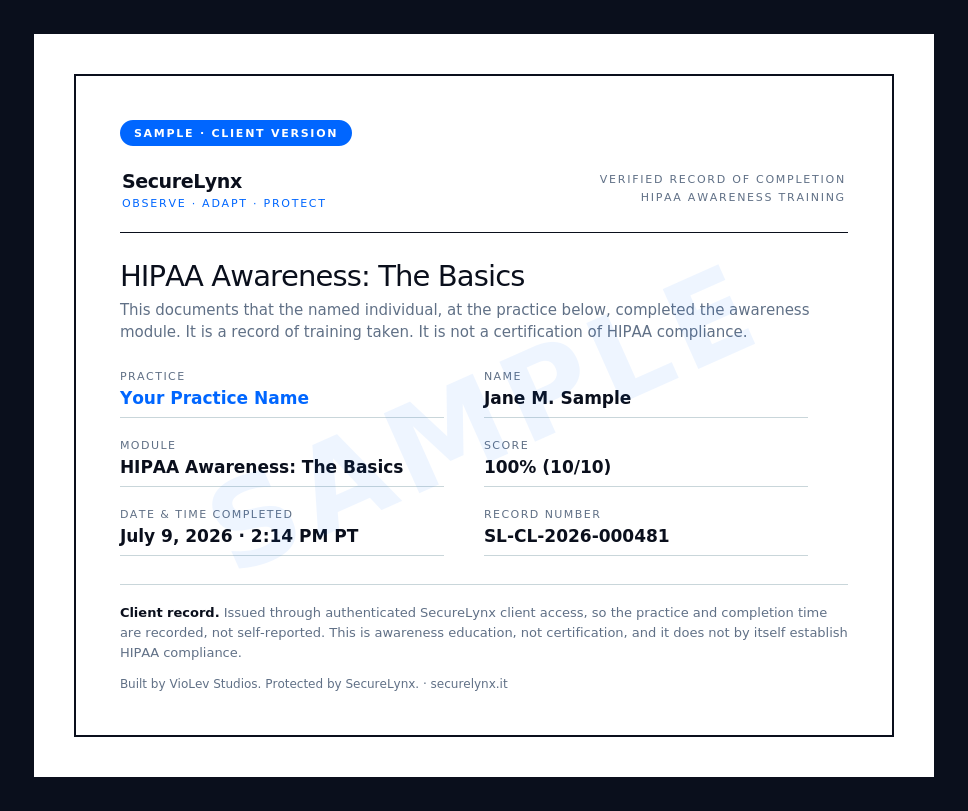
Clients get a verified record
The record above is a self-reported attestation. SecureLynx clients get a verified version, issued through secure client login, that adds the practice name, a full date-and-time stamp, and a record number. Here is what that looks like:
 Ask about client training