
HIPAA Awareness: The Basics
About 15 minutes. Read the short sections below, answer ten questions, and your record of completion displays for you to print or save. It stays in your browser. Nothing is sent to SecureLynx, and nothing is stored.
Read this first
This is free HIPAA awareness education. It is not certification, and completing it does not make you or your practice HIPAA compliant. There is no such thing as being "HIPAA certified."
The record you print at the end is a self-reported record of completion: you type your own name and nothing verifies your identity. It documents that the training was taken. It is not a verified compliance record.
Your name and answers never leave this page. SecureLynx stores no copy. When you finish, the record shows on screen for you to keep. It is the only copy, so save or print it.
What HIPAA protects, and who has to follow it
HIPAA is the federal law that protects patients' health information. If you work in a medical practice, you are part of its "workforce," which means these rules apply to you directly, not just to the practice owner or the IT department.
The goal is simple to state: keep patient information private, keep it accurate, and keep it available to the people who are supposed to have it. Everything below is a way of doing that.
What counts as protected health information (PHI)
PHI is any health information that can be tied to a specific person. It is more than diagnoses and test results. It includes anything that identifies the patient alongside their care, such as:
- Name, address, phone number, email, or dates tied to the patient
- Medical record numbers, account numbers, or insurance details
- Appointment information, visit notes, images, and billing records
- Even a photo, a voicemail, or a sticky note, if it identifies a patient and their care
The minimum necessary rule
Access and share only the information needed for the task in front of you. If you are confirming an appointment, you do not need the full chart. If a request comes in for records, send only what was asked for and authorized, not the entire file "to be safe."
This applies to what you look at as much as what you send. Opening a record you have no work reason to open is a violation, even if you never share it.
Everyday safeguards
Most protection is ordinary habits done consistently:
- Lock your screen whenever you step away, even for a minute
- Use your own login, and use multi-factor authentication where it is offered
- Never share passwords or write them where others can see them
- Do not put PHI in personal email or text messages, or in tools the practice has not approved
- Keep conversations about patients out of waiting rooms, hallways, and elevators
- Verify who you are speaking to before disclosing anything over the phone
Common ways things go wrong
Most incidents are honest mistakes, not attacks. The frequent ones are worth knowing so you can catch them:
- A fax or email sent to the wrong recipient
- Looking up a friend, family member, coworker, or well-known person out of curiosity
- A screen or paper left visible to patients or visitors
- A phishing email that tricks someone into giving up a password
- A lost or unencrypted laptop, phone, or USB drive with PHI on it
If something goes wrong, report it right away
If you think PHI was seen, sent, lost, or accessed the wrong way, report it immediately to your practice's Privacy Officer or Security Officer. Do not try to hide it or fix it quietly. Fast reporting is what lets the practice meet its obligations and limit the harm.
Breach notification timelines and decisions are the practice's responsibility. Your job is to raise it quickly and honestly.
Patients have rights over their information
Patients can ask to see and get a copy of their records, ask to correct information they believe is wrong, and in many cases ask who their information has been shared with. When a patient makes one of these requests, route it to the right person at your practice rather than handling it informally.
Ten questions
Answer all ten. A pass is eight correct (80%). Your answers are scored here in your browser and are never sent anywhere.
HIPAA Awareness Training
HIPAA Awareness: The Basics
This documents that the individual named below completed the awareness module. It is a record of training taken. It is not a certification of HIPAA compliance.
Keep this copy. SecureLynx retains no record of this completion. The name is self-reported and the reference code is for your own filing, not proof of identity. This is awareness education, not certification, and it does not by itself establish HIPAA compliance.
Provided by SecureLynx · securelynx.it
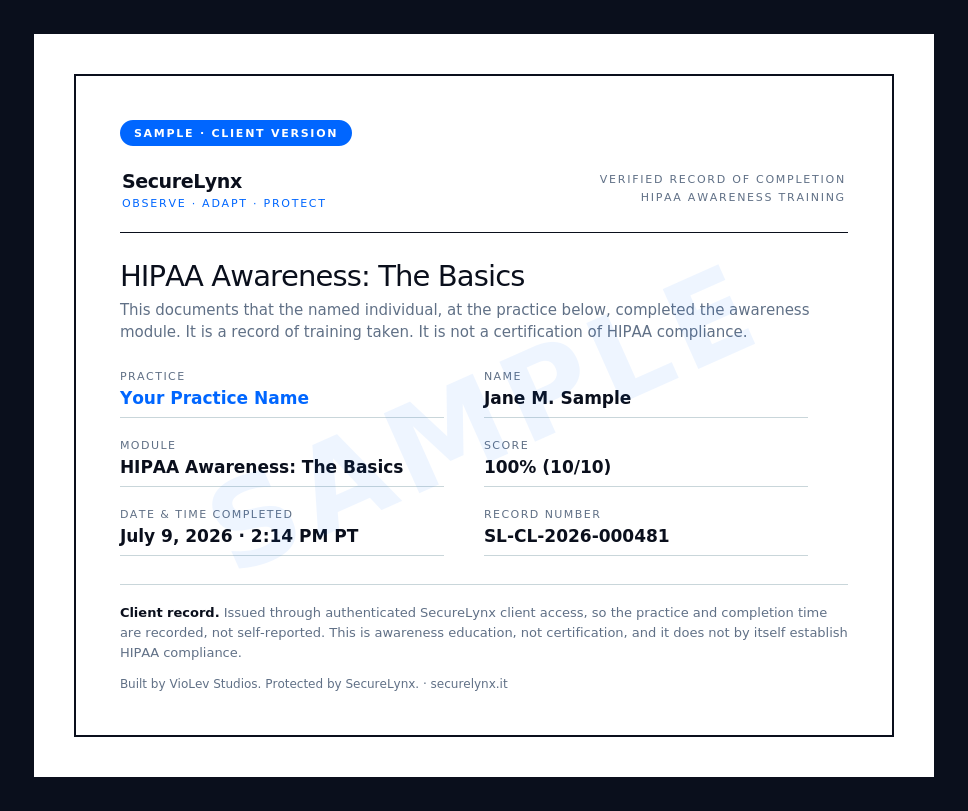
Clients get a verified record
The record above is a self-reported attestation. SecureLynx clients get a verified version, issued through secure client login, that adds the practice name, a full date-and-time stamp, and a record number. Here is what that looks like:
 Ask about client training