
Recognizing and Reporting
About 15 minutes. How to spot the common threats, phishing, ransomware, lost devices, and improper access, and what to do in the first few minutes. Read the short sections, answer ten questions, and your record of completion displays to print or save. Nothing is sent to SecureLynx, and nothing is stored.
Read this first
This is free HIPAA awareness education. It is not certification, and completing it does not make you or your practice HIPAA compliant. There is no such thing as being "HIPAA certified."
The record you print at the end is a self-reported record of completion: you type your own name and nothing verifies your identity. It documents that the training was taken. It is not a verified compliance record.
Your name and answers never leave this page. SecureLynx stores no copy. When you finish, the record shows on screen for you to keep. It is the only copy, so save or print it.
Why fast recognition matters
Most incidents get worse with time and better with speed. The staff member who notices something wrong and reports it in the first few minutes gives the practice its best chance to limit the harm. You do not need to be a security expert. You need to recognize the common warning signs and know who to tell.
The two rules that run through everything below: report early, even when you are not sure, and do not try to investigate, fix, or cover up an incident on your own.
Phishing and social engineering
Phishing is an attempt to trick you into giving up a password or clicking something harmful. The strongest signs are a sense of urgency, a request to log in or "verify" through a link, and a push to act before you think. A logo, your name, or business-hours timing do not make a message safe.
Social engineering is the same idea over phone or in person: someone pretends to be a boss, a vendor, or IT to get information or money. If a message or call pressures you to buy gift cards, move money, or hand over credentials, verify it through a known, separate channel before acting. Replying to the same email or calling a number the message gives you is not verification.
Malware and ransomware warning signs
Watch for files you cannot open or that suddenly have strange names, a message demanding payment to unlock your data, unexpected pop-ups, programs you did not install, or a machine that slows to a crawl. If you see these, stop using the device, disconnect it from the network if you are told to, and report it to IT or your Security Officer immediately.
Staff never pay, negotiate with, or reply to an attacker. That is not your job and it makes things worse. Report it and follow IT and Security direction.
Lost or stolen devices
A missing phone, laptop, tablet, or USB drive that can reach practice email, systems, or PHI is an incident, even if you think it will turn up. Report it right away so access can be secured or the device wiped remotely. Changing one password and hoping is not enough.
Physical security
Not every threat is digital. If someone you do not recognize follows you through a badge-controlled door into a staff area, do not simply hold the door to be polite. Direct them to check in, or alert the right person. Keep visitors out of areas with PHI, and do not leave records or unlocked screens where visitors can see them.
Recognizing improper access
Incidents are not always outsiders. If you notice a coworker browsing the record of a patient who is not theirs, out of curiosity, that is a privacy concern worth reporting through your practice's process, whether or not anything was shared and whether or not the patient ever finds out.
What to do, and who to tell
When you see or suspect a problem, report it promptly to your Privacy or Security Officer, or whoever your practice designates, and let them assess it. Report even when you are unsure it is real: a false alarm costs a few minutes, a missed incident can cost far more.
If the incident is your own mistake, report it anyway, honestly and quickly. Do not quietly fix it, wait to see if anyone noticed, or blame a glitch. Fast, honest reporting is what protects patients and the practice.
Ten questions
Answer all ten. A pass is eight correct (80%). Your answers are scored here in your browser and are never sent anywhere.
HIPAA Awareness Training
Recognizing and Reporting
This documents that the individual named below completed the awareness module. It is a record of training taken. It is not a certification of HIPAA compliance.
Keep this copy. SecureLynx retains no record of this completion. The name is self-reported and the reference code is for your own filing, not proof of identity. This is awareness education, not certification, and it does not by itself establish HIPAA compliance.
Provided by SecureLynx · securelynx.it
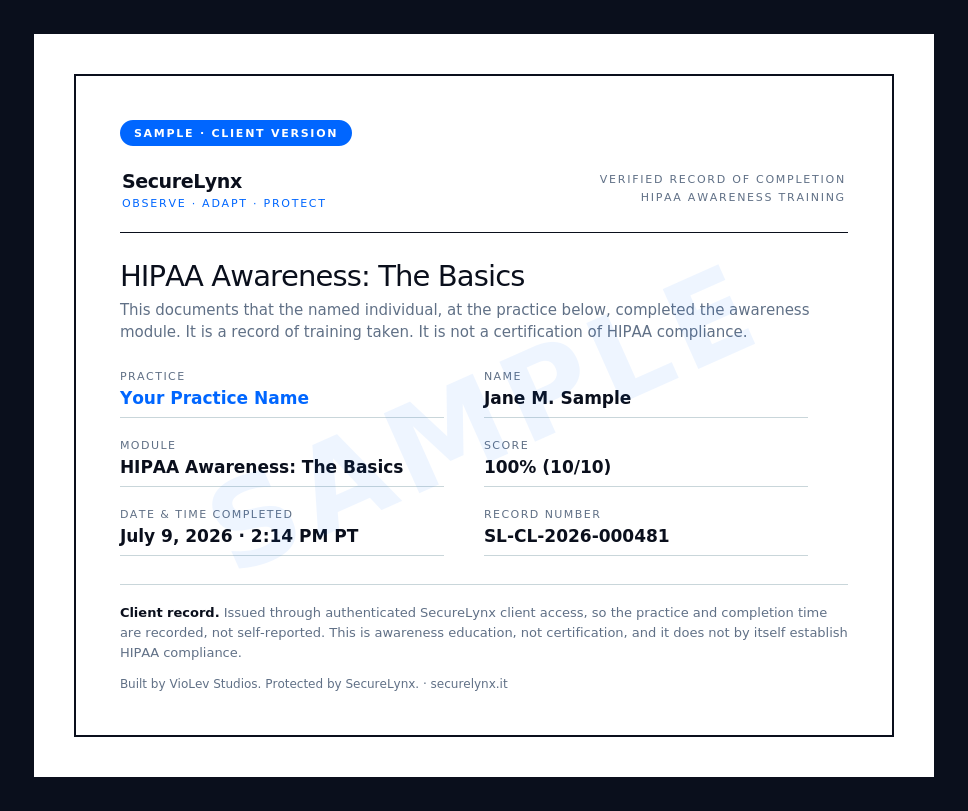
Clients get a verified record
The record above is a self-reported attestation. SecureLynx clients get a verified version, issued through secure client login, that adds the practice name, a full date-and-time stamp, and a record number. Here is what that looks like:
 Ask about client training